
Track spending, remember appointments, manage tasks and find documents —
just send Alfred a message or a voice note. All inside one app.
No linking your bank, no spreadsheets. Just tell Alfred what you spent by text or voice note, and he logs it, categorises it and keeps your spending tidy. "Spent $12.40 on lunch." Done.
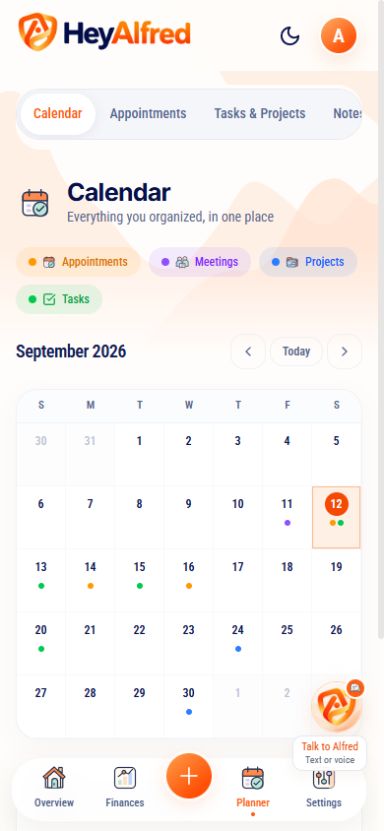
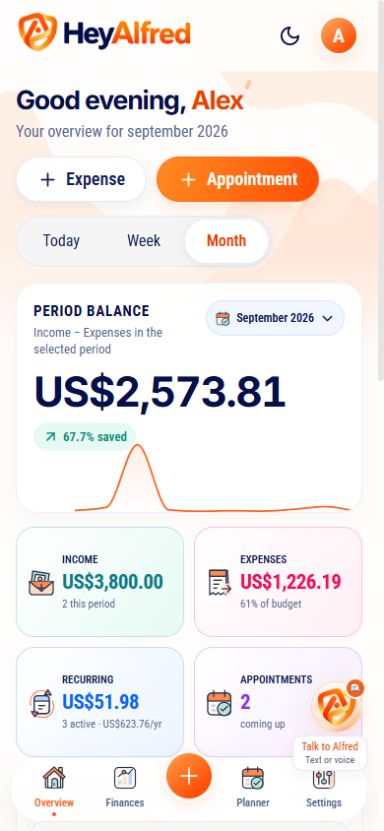
Your calendar and financial overview
Your spending, appointments and tasks in one sleek dashboard. You always know what happened, what is pending and what is coming up.
Add a dentist appointment, a council tax deadline or a reminder to call James — just say it in the Alfred chat. Alfred sets it up and nudges you before it's due, and you can pop any appointment into your Google Calendar with a single tap.

All set! Tap to add it to your Google Calendar too 🗓️
Get instant clarity on every transaction and see the financial impact of the months ahead.
Know how much you have already committed for the months ahead and project your cash flow.
Tell Alfred what you spent and he sorts it into the right category for you — so your spending stays organised without the faff.
Get full clarity on the source of every transaction in your statement.
It doesn't matter how you speak or what you ask. Got a question? Just ask him.
With a simple voice note, you can:
Whether it's a quick task, a big project, a meeting or an idea that just popped up — HeyAlfred notes it, organises it and keeps track of it all for you.
Create projects in your dashboard and track what is left to do, what is overdue and what is done.
Break each project into small to-dos. Set priorities and keep track of your progress.
"I need to write the conclusion of my thesis by 30 November"
Keep reminders for deadlines, follow-ups and meetings alongside your projects. Tell Alfred what you need to remember and check it in your app.
Upload a recording or paste a transcript in Meetings to get a summary and action items.
Keep loose ideas and project insights together in Notes, then search for them when you need them.
"I had an idea about the expansion project..."
Attach a receipt or PDF and ask Alfred to explain the details. Summarise a statement or register a receipt, then review the result in your conversation.
Attach a photo or PDF up to 5 MB in your private Alfred conversation.
Alfred reads the attachment and helps you understand the amounts and details.
Your attachments and Alfred’s explanations stay together in your chat, ready to review when you need them.
Read this receipt for me 👆
Here are the details from your attached receipt.
What does this receipt include?
Here are the details from your attached receipt: 👇
See how a conversation with Alfred works inside the app. Tap a message to send it — he logs the spend, books the appointment, sets the reminder or explains an attached document. Then ask for your week and watch it all come together.
Follow the conversation below. Your own records stay inside your HeyAlfred account.
Finances, appointments, tasks, notes, meetings and documents — all handled right inside HeyAlfred.





James Whitfield
"It completely changed how I organise my money. I send a voice note and Alfred sorts it all. It just works."
Finances, calendar, tasks, documents and Alfred chat in one simple subscription.
Everything you need to know about HeyAlfred before you start.
HeyAlfred brings your finances, calendar, tasks, projects, notes and documents together in one app. Open the Alfred chat and send a message or a voice note. Alfred understands your request, organises the details and keeps them connected to your dashboard.
Open HeyAlfred in your browser on your phone or computer. You can also add it to your phone’s home screen for quick access. The chat and dashboard are both inside the app — no separate messaging service or phone-number connection needed.
Send a message, voice note or photo in the Alfred chat. Describe what you spent or what you need to plan, and Alfred organises the details. You can review the result in the conversation and in your dashboard.
HeyAlfred works in modern browsers on Android, iPhone and desktop. Open the app, sign in and tap the Alfred button to start a conversation. Your finances, calendar and projects are in the same place.
Yes. Record your meeting or send Alfred the audio, and he turns it into clear minutes — a summary of what was discussed plus a ready-to-use list of action items. Alfred doesn't host the call itself; he handles the notes so you don't have to.
Attach a photo or PDF, up to 5 MB, in the Alfred chat. Ask for a summary, check the amounts or request an expense entry from a receipt. The attachment and response remain in your private conversation. You review entries in the dashboard.
Yes. HeyAlfred is built with UK GDPR principles in mind. Crucially, Alfred never connects to your bank — you choose exactly what to share with him. Your information is encrypted in transit, used only to organise your expenses, appointments, tasks and documents, and never sold to third parties. You can export or permanently delete your data at any time from your dashboard.
Yes! We offer a no-questions-asked 7-day money-back guarantee. If within that period you feel HeyAlfred isn't for you, we'll refund 100% of what you paid. No hassle, no questions. You can also manage or cancel your subscription from Settings.
No. Alfred never needs access to your bank account. You simply tell him what you spent — by text or voice note — and he logs and organises it for you. You stay completely in control of what you share.
Yes. Send Alfred a voice note and he understands and sorts it for you — log an expense, set a reminder or add an appointment — with no typing needed.

HeyAlfred looks after your finances and appointments in the same place you chat, plan and check your day. Send a message, record a voice note and keep everything together.
A cutting-edge, reliable product with a clear purpose: to help you live better and more organised, every day.
